Like every computer scientist or enthusiast, over the years I’ve piled up an impressive number of components: CPUs, memory, disks, cases, power supplies and boards of every kind.
Anything more than 10 years old is considered obsolete, and yet these components are still perfectly functional and can run almost anything decently. Does that apply to AI models too? Definitely not!
But there is a loophole: what matters is the GPU, because the LLM runs entirely there. The rest of the machine doesn’t need to be particularly sophisticated.
The plan#
So the idea is simple: we can reuse old components we may already own and focus the spending on the GPU. That way we can afford a personal AI without spending a fortune.
Actually, even the GPU could be second-hand. You can read pretty much everywhere that NVIDIA’s RTX 3090 is still an excellent choice, but it keeps very high prices (around €1000 today), and its power draw is just as high. Besides, a single 3090 might be a tight fit with its 24GB of VRAM.
NVIDIA isn’t the only option, but it makes things simpler: all the software, especially for machine learning, inference and everything else you need for local AI, has the best support on NVIDIA hardware, since it relies on the proprietary CUDA libraries.
Requirements and choices#
To build my local inference machine, I first need to define what I consider the minimum requirements to run a model capable enough for my needs.
On August 14, 2026 the weights of Qwen3.8-27B were released. At the same size as the previous version 3.6, it improves performance even further and is still unbeaten among models of its size, at least in my personal opinion. Qwen3.8-27B is therefore the model I chose for local inference.
Hosting a 27B LLM means taking up ~18-23GB of VRAM on the GPU, depending on the quantization used (int4, fp4). On top of that comes the KV cache, which, if you want to support the full native context window (262K tokens), amounts to ~8 GiB = 8.6 GB. It follows that 32GB of VRAM is the minimum requirement.
The problem is that NVIDIA’s only consumer product with 32GB is the RTX 5090, which, besides being impossible to find, has a prohibitive price I won’t even bother to mention. So I fell back on a dual-GPU setup with two 16GB RTX 5060 Ti cards used in parallel (’tensor parallel’). We’ll see later that this setup has both advantages and disadvantages. Still, I consider it the best compromise between performance and power consumption (180W TDP and 3W at idle), and being a ‘Blackwell’ generation card it natively supports NVFP4 quantization. I refer you to NVIDIA’s documentation to appreciate the differences between the various 4-bit floating-point formats.
The final configuration#
The PC I used was originally built as a gaming PC, but given how much it was used, or perhaps I should say not used, I repurposed it for local inference.
The configuration and costs are summarized in the table.
| Component | Model | Already owned | Cost (€) |
|---|---|---|---|
| CPU | Intel Core i7-3770 | ✅ | 0 |
| CPU cooler | Thermalright sl-100 | ✅ | 0 |
| Motherboard | Gigabyte GA-Z77X-UD3H | ❌ | 79 |
| RAM | 32GB DDR3 (4x8GB) | ✅ | 0 |
| SSD | Samsung 860 EVO mSATA 500GB | ✅ | 0 |
| PSU | be quiet! Pure Power 12M 650W | ✅ | 0 |
| Case | very old Cooler Master case | ✅ | 0 |
| GPU (x2) | Asus DUAL RTX 5060 Ti OC | ❌ | 580*2 |
Making the PC fit for inference cost €1239. That’s similar to, or less than, a single-card solution from AMD or Intel, with all the complications that come with it. I chose to swap the motherboard for one (GA-Z77X-UD3H) that could allocate 8 lanes to both PCIe x16 slots. These are PCIe 3.0 rather than the 5.0 supported by the RTX 5060.
Is it a lot? Is it little? It depends. Justifying an expense is a function of many parameters, each weighted by your personal situation. In my case, this expense brings no financial return at all: it’s driven by passion and personal interest, and I believe it’s the minimum possible spend.
Power consumption#
For a server in a home lab, idle power consumption matters a lot: most of the time, in fact, the machine isn’t doing anything.
Although this post isn’t about software, it’s worth knowing that this machine runs Proxmox. Power consumption was measured with the following running:
- 1 LXC container (Debian GNU/Linux 13 trixie) for the inference engine, with access to the GPUs
- 1 Linux Ubuntu 26.04.1 LTS VM for the agent environment (Hermes)
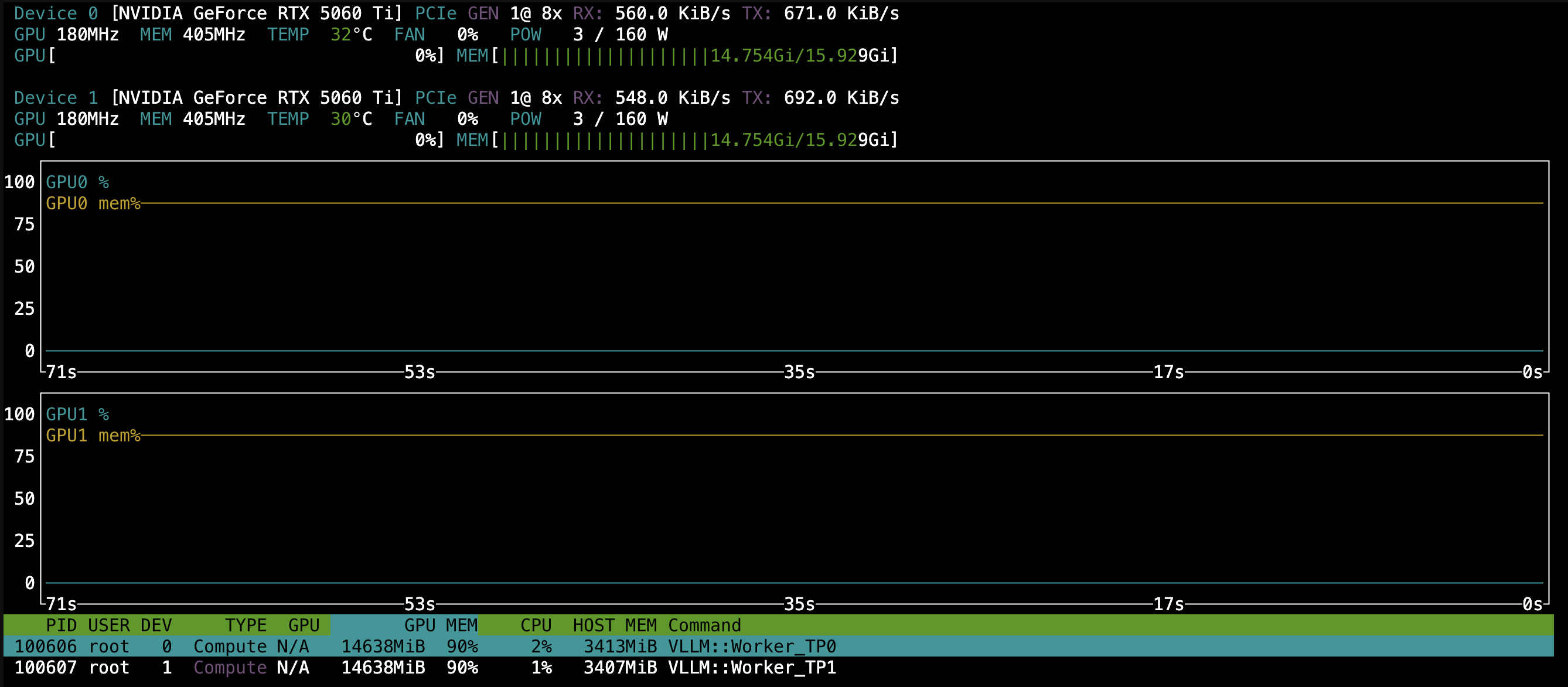
Above: RTX 5060 Ti idle power consumption.
According to ’nvtop’, the 5060 Ti cards draw very little: 3W per GPU. Maximum power has been capped at 160W (vs. 180W stock).
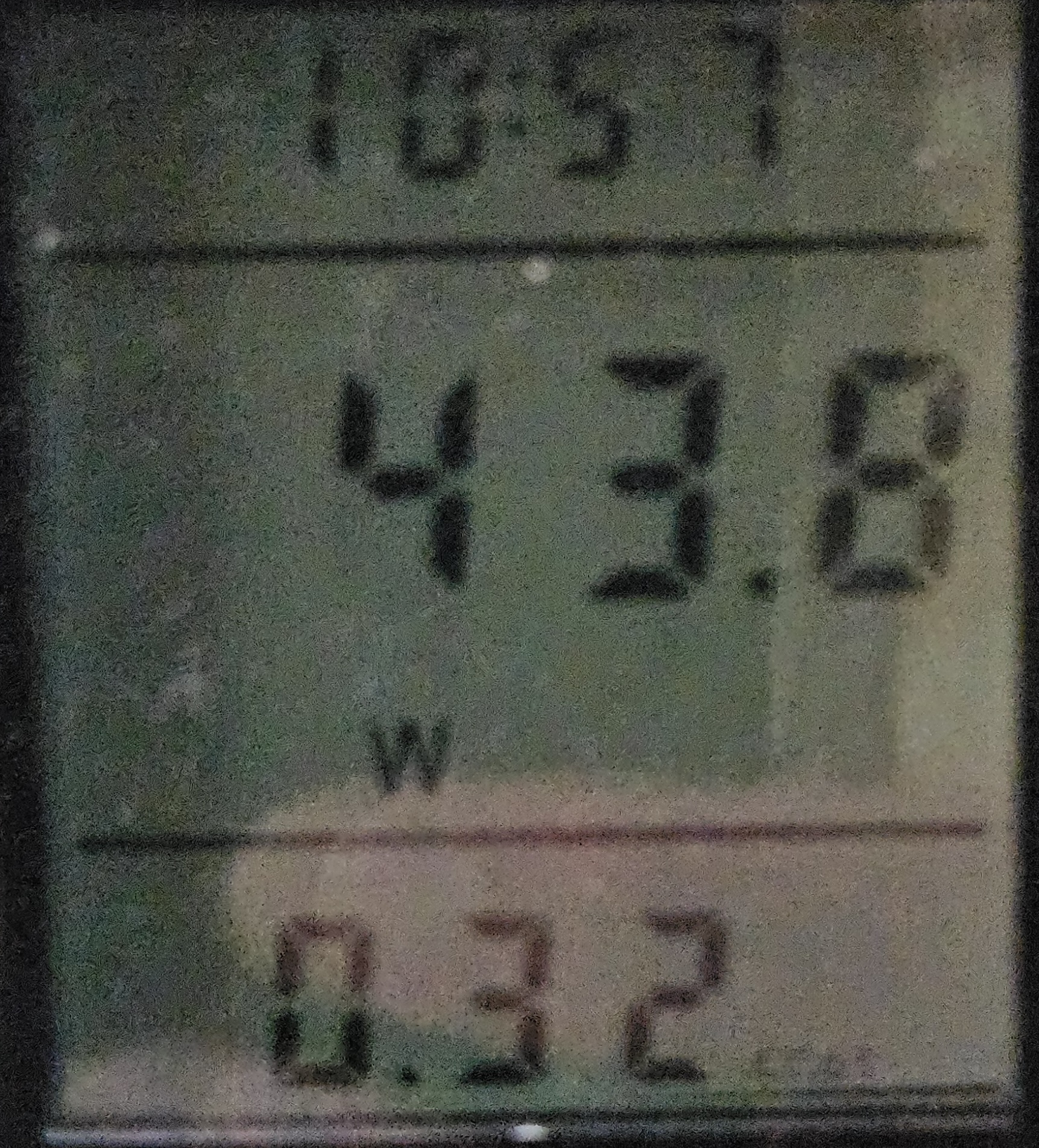
Above: whole-system idle power consumption.
The whole system’s idle consumption, measured at the power supply input, comes to 44W. Considering that all CPU C-states were enabled in the BIOS, and that the audio and the Marvell 88SE9172 SATA controller were disabled, I don’t think it’s a low figure in absolute terms for doing nothing. Maybe my main server (an HP Elitedesk 800 mini G9), which draws 6-8W at idle, has spoiled me!
For those who want more, you might squeeze out a bit by turning off all the SATA ports (only one is used by the SSD) and disabling the Intel iGPU, making the system headless. Still, you can’t expect miracles from a 2012(!) system with DDR3 RAM.
On the other hand, the maximum consumption I’ve observed during inference is 294W. I’ve never seen a single card go above 120W, so the GPUs’ power could be capped further, down to 140W, without hurting performance.
Cost of power#
Let’s assume the system is always idle and that the hours spent on inference are negligible in a home setting. Let’s also assume a cost of €0.25 per kWh, including taxes, fees and whatnot. We get:
€7.92 a month is the minimum electricity cost of having a local AI with this machine. With a solar power system, the cost roughly halves on average over the year. The comparison with my Anthropic Pro subscription is merciless: €18 a month. Little more than double, for several orders of magnitude more capability! But if you want a local AI, you have to look beyond the bare numbers.
Final thoughts and limitations#
With €1239 and a PC from 2012 I got a machine with 32GB of VRAM, able to host Qwen3.8-27B in NVFP4 with a generous KV cache and modest idle power consumption. There is a trade-off, though, and it should be stated clearly: the potential bottleneck is the PCIe 3.0 bus.
The RTX 5060 Ti cards use 8 PCIe 5.0 lanes, which works out to about 32 GB/s per direction. On the GA-Z77X-UD3H the same 8 lanes run at PCIe 3.0: about 8 GB/s, a quarter of the bandwidth the cards were designed for.
How much does this limitation weigh? Less than you might think, but it’s there:
- During generation, the model and the KV cache live entirely in VRAM, so the bandwidth that matters is the GPU’s memory bandwidth, not the bus’s.
- Tensor parallel, on the other hand, forces the two GPUs to exchange intermediate results at every layer. Consumer cards have no NVLink, so this traffic goes over the PCIe bus and through the CPU’s memory as well (the NCCL library doesn’t use P2P mode, but SHM). For each generated token, little data is exchanged and latency is what matters most. During the prefill of a long prompt, however, the volumes grow, and that’s where PCIe 3.0 might make itself felt.
- Loading the model is slow because of the mSATA SSD (about 550 MB/s): it takes tens of seconds to read almost 18GB. But this only happens when the inference server starts.
I could have avoided the problem with a more modern platform, but I would have had to replace the CPU and RAM too, at a very different cost. For personal use, where having a capable model and a large context matters more than top speed, I consider the trade-off acceptable.
Impressions count for little, though: we need numbers. In the next post, dedicated to software, I’ll put this configuration to the test and we’ll see how much these limitations really weigh on performance.