
The perfect software, like the perfect hardware, doesn’t exist: it depends on what you want to achieve.
I favour stability and reliability, and I always use open-source software or, in the case of LLMs, open-weight models. In AI everything changes at breakneck speed: chasing every new release is impossible and not very useful either, but you often find yourself having to try a new version of something or tweak a delicate parameter. It takes next to nothing to break everything, beyond repair. Without a solid safety net, the PC stays out of action until you find the time to fix it.
The operating system#
Proxmox is my choice of operating system (OS) for the inference PC. The ability to isolate specific applications or services in LXC containers or VMs, together with snapshots and backups, keeps you reasonably safe from the problems I mentioned. Snapshots and backups can be stored locally, on the same disk where Proxmox is installed. For greater reliability, however, it’s advisable to use a remote share on a NAS or, better still, a dedicated backup service such as Proxmox Backup Server (PBS). I went for the latter, creating a VM dedicated to PBS on my Synology NAS.
Proxmox is a fairly complex system, and I’m the first to admit I don’t use many of its advanced features. For example, I’ve disabled all the High Availability (HA) services: even though I have several machines running Proxmox, I don’t use clustering, let alone HA. For a practical overview of how to install Proxmox on your AI server, I refer you to the guide by digitalspaceport.
Inference engines#
There are two kinds of inference software:
aimed at personal inference, that is, for a single user. Llama.cpp and its derivatives are the typical example.
aimed at enterprise inference, typically in datacenters. Here the priority is performance with many parallel requests. Hardware support targets mainly high-end GPUs, where NVIDIA is at home. vLLM and SGLang are the reference solutions in this category.
I adopted vLLM because it natively supports NVFP4 quantization on Blackwell GPUs and tensor parallel across multiple GPUs, and because it has a larger community.
For efficiency, vLLM runs inside an LXC container (Debian 13) that is granted access to the system’s GPUs. This way access is more direct, faster and cheaper: there are no extra software layers such as the kernel and drivers of a VM with its own OS.
To start the inference server with the selected model I use Docker, with a docker-compose.yml file for each model or model version I want to try.
You’ll find the docker-compose.yml file to use as a template on my git.
LLM#
As I explained previously, the model I adopted is Qwen3.8-27B. I prefer a single model, very capable for its size, with the largest possible context (KV cache), which comes in handy for agent sessions. This means that even the simplest requests always invoke an LLM that takes up all the resources of the local system. Qwen3.8 handles image-to-text, video-to-text and text-to-text: image generation, text-to-audio and audio-to-text are therefore left out, unless implemented on the CPU.
Alternatively, you can take a different, more sophisticated approach: a compact LLM acts as a router and dispatches requests to models of different sizes, capabilities and specializations. This solution, however, requires extra resources (GPUs or NPUs) that my hardware doesn’t have at the moment.
Since the two RTX 5060 Ti cards in the inference machine are Blackwell class, the Qwen quantization I adopted is NVFP4. There are dozens of NVFP4 quantizations of this model, and I’ve tested several, including:
- nvidia/Qwen3.8-27B-NVFP4: 21.9 GB
- unsloth/Qwen3.8-27B-NVFP4: 23.4 GB
- gittensor-model-hub/Qwen3.8-27B-NVFP4-RTX5090: 17.9 GB
It’s no accident that I listed the size of each model. On average, an NVFP4 quantization takes up more space than an INT4 one, and 22-24 GB starts to be too much if you also want a generous KV cache. That’s why I chose the gittensor model: although it was designed for a single RTX 5090, it works perfectly in a tensor parallel setup. In my configuration I can’t fully use the 32 GB of VRAM, because each GPU has to keep room for the CUDA context data structures, the NCCL buffers and the CUDA Graphs. As a result, I don’t reach 262K tokens of KV cache, but a respectable 237K.
I won’t go into the details of how Gittensor managed to shrink the NVFP4 model while keeping quality on par with (or better than) its competitors, at least according to the benchmarks. On this my approach is pragmatic: a model is effective if it systematically gets done the tasks I give it.
Hermes#
I adopted Hermes as my local agentic platform. You’ll find countless resources online on how to install, configure and use it.
For security reasons, I installed Hermes in a VM (Ubuntu 26.04.1 LTS) with a non-sudoer user. Besides the local Qwen3.8-27B, I defined an agent (or profile) in it that has access to Claude Code through my Pro subscription. This feature is very interesting because it lets Hermes use Claude Code, the console program, directly, and therefore Anthropic’s models without going through the expensive APIs.
Putting it all together#
flowchart TB
    subgraph HW["Inference PC: Intel i7-3770 + 2x RTX 5060 Ti 16 GB (Blackwell)"]
        subgraph PVE["Proxmox"]
            subgraph LXC["LXC container: Debian 13 (direct GPU access)"]
                subgraph DOCKER["Docker (one docker-compose.yml per model)"]
                    VLLM["vLLM
tensor parallel on 2 GPUs"]
                    LLM["Qwen3.8-27B NVFP4 (gittensor, 17.9 GB)
KV cache: 237K tokens"]
                    VLLM --- LLM
                end
            end
            subgraph VM["VM: Ubuntu 26.04.1 LTS (non-sudoer user)"]
                HERMES["Hermes
agentic platform"]
                CC["Claude Code"]
                HERMES -- "Claude profile" --> CC
            end
        end
    end

    HERMES -- "local profile
(vLLM API)" --> VLLM
    CC -- "Pro subscription" --> ANT["Anthropic models
(cloud)"]

    subgraph NAS["Synology NAS"]
        PBS["Proxmox Backup Server VM"]
    end
    PVE -. "snapshots and backups
of LXC and VMs" .-> PBS
The diagram shows the overall architecture of the system and summarizes the hardware and software involved.
Let’s test the model#
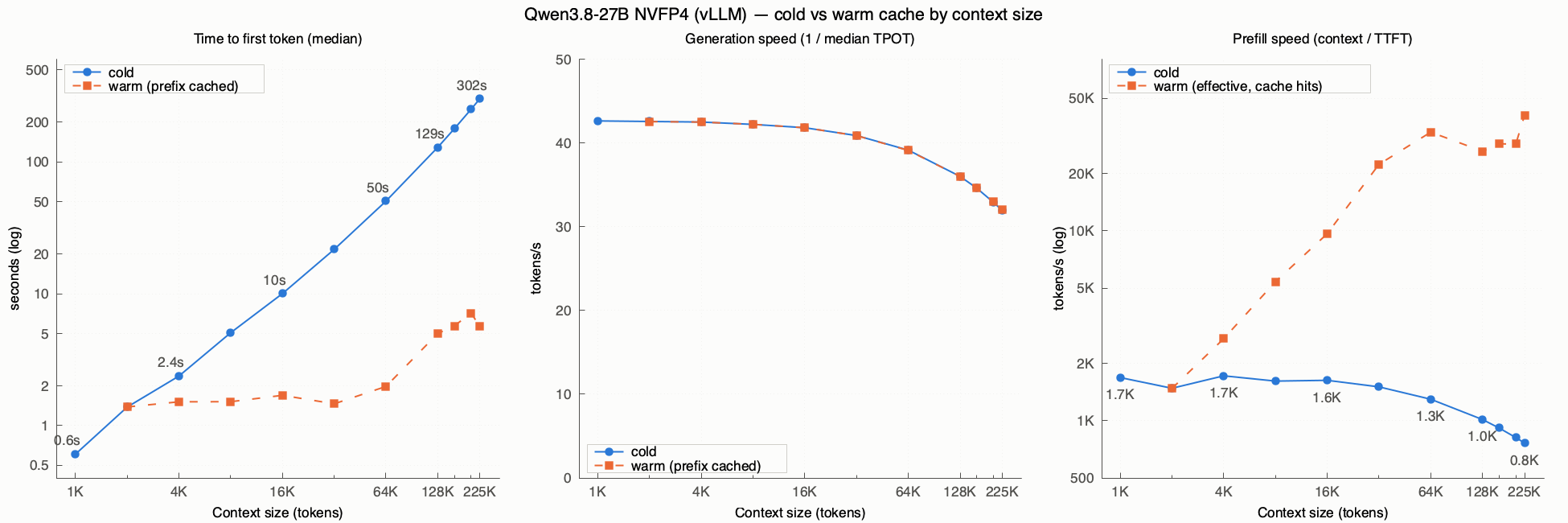
Finally, after all this talk, let’s look at some numbers. I distinguished two extreme cases:
- cold: every prompt is different, so the prefill is fully recomputed and vLLM’s prefix caching doesn’t help. It simulates completely independent requests, that is, the worst case.
- warm: all requests share the prefix and only a suffix of S tokens changes (S = 1K). It simulates an agent turn, with a tool result and a new message.
There are three parameters of interest:
- Time to first token (TTFT): the median time needed to generate the first token.
- Generation speed: tokens generated per second (1000 divided by the median time per token, in ms).
- Prefill speed: the context size divided by the TTFT. In the warm case it’s an effective speed, because most of the prompt is already cached.
Each has its own chart, with measurements as the context grows from 1K to 225K tokens (from 2K in the warm case). You’ll find my test script on my git as well.
What the numbers say#
Prefix caching makes all the difference. In the cold case TTFT grows with the context, and beyond 64K even more than proportionally: 0.6 seconds at 1K, 10 seconds at 16K, 50 seconds at 64K, over two minutes at 128K and about 5 minutes at 225K. In the warm case, on the other hand, the first token arrives in under 2 seconds up to 64K and in 5-7 seconds even with the longest contexts. This is what makes agentic sessions usable: at each turn the model reprocesses only the new part, not the whole conversation.
Generation degrades gently. Speed stays around 42 tokens per second up to 8K, drops to about 39 at 64K and to 32 at 225K: for every generated token the model has to consult an ever-larger KV cache. Cold and warm are practically identical, as expected: the cache speeds up reading the prompt, not writing the answer.
Cold prefill is the real bottleneck. Without the cache, the two RTX 5060 Ti cards process about 1,500-1,700 tokens per second up to 32K; then speed drops to 1,300 at 64K, 1,000 at 128K and about 800 at 225K. In the warm case the effective speed climbs to 25,000-40,000 tokens per second, but that’s no hardware miracle: simply, almost the entire prompt is already cached.
In practice: pasting in a long document from scratch is expensive, but a conversation that grows one turn at a time stays smooth even with hundreds of thousands of tokens of context. So it pays to avoid anything that invalidates the cache, such as changing the system prompt or the list of tools mid-session.
Final thoughts#
Proxmox, vLLM and Hermes make up a stack that may not be trivial to set up, but it’s solid: every component is isolated, protected by snapshots and backups, and replaceable without risking the rest of the system. I can try a new model or a new version of vLLM knowing that, if something goes wrong, rolling back is a matter of minutes.
On the performance front, a 27B model on two mid-range GPUs generates between 32 and 42 tokens per second and, thanks to prefix caching, responds within a few seconds even with contexts over 200K tokens. For personal and agentic use it’s a more than satisfying result, especially considering the cost and limitations of the hardware.